Fragments
Fragments are one of the distinguishing features of Relay. They let each component declare its own data needs independently, while retaining the efficiency of a single query. In this section, we’ll show how to split a query up into fragments.
To start with, let’s say we want our Story component to show the date that the story was posted. To do that, we need some more data from the server, so we’re going to have to add a field to the query.
Go to Newsfeed.tsx and find NewsfeedQuery so that you can add the new field:
const NewsfeedQuery = graphql`
  query NewsfeedQuery {
    topStory {
      title
      summary
      createdAt // Add this line
      poster {
        name
        profilePicture {
          url
        }
      }
      thumbnail {
        url
      }
    }
  }
`;
Now we've updated the query, we need to run the Relay compiler so that it knows about the updated Graphql query by running npm run relay.
Next, go to Story.tsx and modify it to display the date:
import Timestamp from './Timestamp';

type Props = {
  story: {
    createdAt: string; // Add this line
    ...
  };
};

export default function Story({story}: Props) {
  return (
    <Card>
      <PosterByline poster={story.poster} />
      <Heading>{story.title}</Heading>
      <Timestamp time={story.createdAt} /> // Add this line
      <Image image={story.thumbnail} />
      <StorySummary summary={story.summary} />
    </Card>
  );
}
The date should now appear. And thanks to GraphQL, we didn't have to write and deploy any new server code.
But if you think about it, why should you have had to modify Newsfeed.tsx? Shouldn’t React components be self-contained? Why should Newsfeed care about the specific data required by Story? What if the data was required by some child component of Story way down in the hierarchy? What if it was a component that was used in many different places? Then we would have to modify many components whenever its data requirements changed.
To avoid these and many other problems, we can move the data requirements for the Story component into Story.tsx.
We do this by splitting off Story’s data requirements into a fragment defined in Story.tsx. Fragments are separate pieces of GraphQL that the Relay compiler stitches together into complete queries. They allow each component to define its own data requirements, without paying the cost at runtime of each component running its own queries.
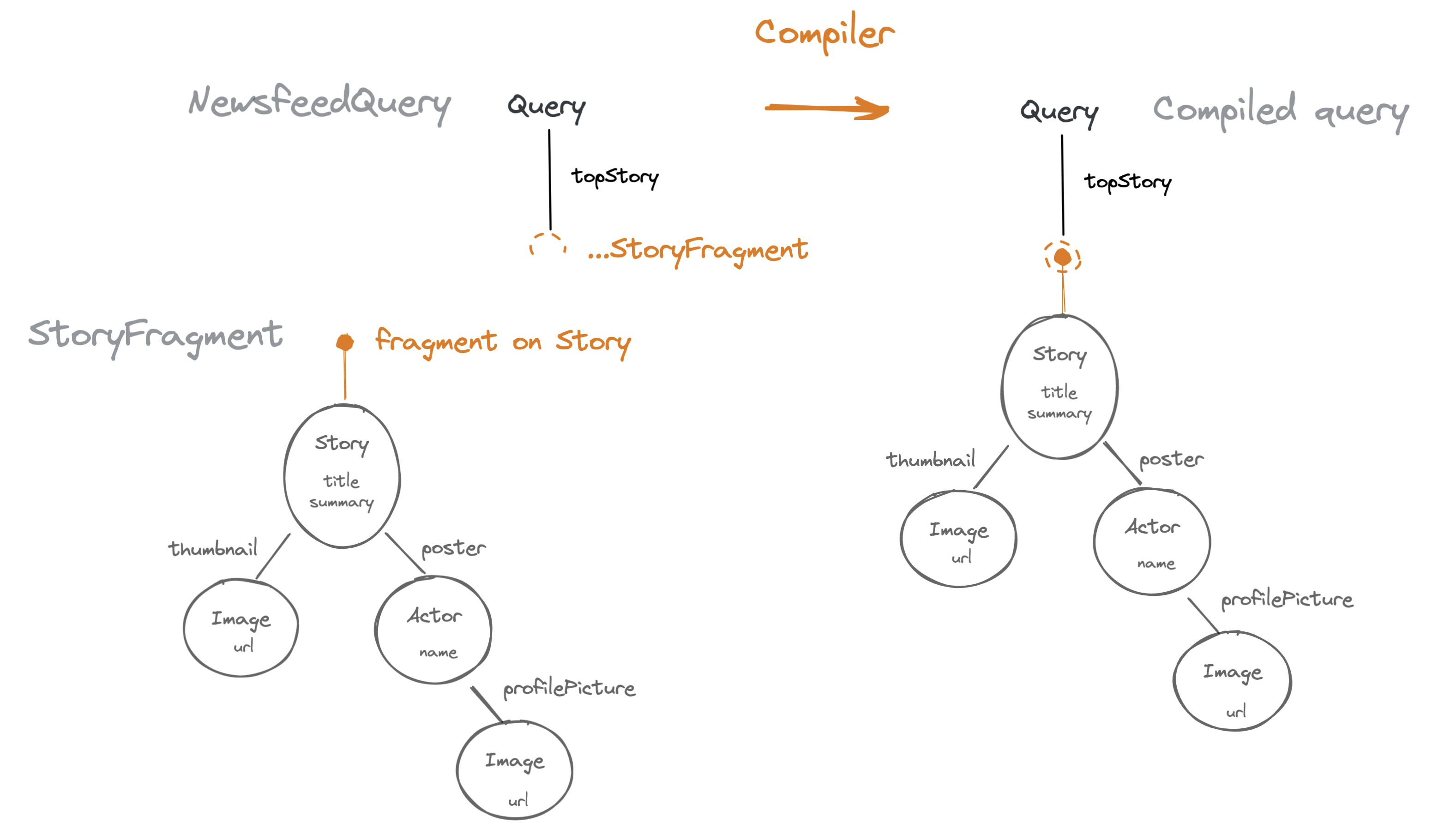
Let’s go ahead and split Story’s data requirements into a fragment now.
Step 1 — Define a fragment
Add the following to Story.tsx (within src/components) above the Story component:
import { graphql } from 'relay-runtime';

const StoryFragment = graphql`
  fragment StoryFragment on Story {
    title
    summary
    createdAt
    poster {
      name
      profilePicture {
        url
      }
    }
    thumbnail {
      url
    }
  }
`;
Note that we’ve taken all of the selections from within topStory in our query and copied them into this new Fragment declaration. Like queries, fragments have a name (StoryFragment), which we’ll use in a moment, but they also have a GraphQL type (Story) that they’re “on”. This means that this fragment can be used whenever we have a Story node in the graph.
Step 2 — Spread the fragment
Go to Newsfeed.tsx and modify NewsfeedQuery to look like this:
const NewsfeedQuery = graphql`
  query NewsfeedQuery {
    topStory {
      ...StoryFragment
    }
  }
`;
We’ve replaced the selections inside topStory with StoryFragment. The Relay compiler will make sure that all of Story’s data gets fetched from now on, without having to change Newsfeed.
Step 3 — Call useFragment
You’ll notice that Story now renders an empty card! All the data is missing! Wasn’t Relay supposed to include the fields selected by the fragment in the story object obtained from useLazyLoadQuery()?
The reason is that Relay hides them. Unless a component specifically asks for the data for a certain fragment, that data will not be visible to the component. This is called data masking, and enforces that components don’t implicitly rely on another component’s data dependencies, but declare all of their dependencies within their own fragments. This keeps components self-contained and maintainable.
Without data masking, you could never remove a field from a fragment, because it would be hard to verify that some other component somewhere wasn’t using it.
To access the data selected by a fragment, we use a hook called useFragment. Modify Story to look like this:
import { useFragment } from 'react-relay';

export default function Story({story}: Props) {
  const data = useFragment(
    StoryFragment,
    story,
  );
  return (
    <Card>
      <Heading>{data.title}</Heading>
      <PosterByline poster={data.poster} />
      <Timestamp time={data.createdAt} />
      <Image image={data.thumbnail} />
      <StorySummary summary={data.summary} />
    </Card>
  );
}
useFragment takes two arguments:
- The GraphQL tagged string literal for the fragment we want to read
- The same story object as we used before, which comes from the place within a GraphQL query where we spread the fragment. This is called a fragment key.
It returns the data selected by that fragment.
We’ve rewritten story to data (the data returned by useFragment) in all of the JSX here; make sure to do the same in your copy of the component, or it won't work.
Fragment keys are the places in a GraphQL query response where a fragment was spread. For example, given the Newsfeed query:
query NewsfeedQuery {
  topStory {
    ...StoryFragment
  }
}
Then if queryResult is the object returned by useLazyLoadQuery, queryResult.topStory will be a fragment key for StoryFragment.
Technically, queryResult.topStory is an object that contains some hidden fields that tell Relay's useFragment where to look for the data it needs. The fragment key specifies both which node to read from (here there's just one story, but soon we'll have multiple stories), and what fields can be read out (the fields selected by that specific fragment). The useFragment hook then reads that specific information out of Relay's local data store.
As we'll see in later examples, you can spread multiple fragments into the same place in a query, and also mix fragment spreads with directly-selected fields.
Step 4 — TypeScript types for fragment refs
To complete the fragmentization, we also need to change the type definition for Props so that TypeScript knows this component expects to receive a fragment key instead of the raw data.
Recall that when you spread a fragment into a query (or another fragment), the part of the query result corresponding to where the fragment is spread becomes a fragment key for that fragment. This fragment key is the object that you pass to a component to tell it where in the graph to read the fragment from.
To make this type-safe, Relay generates a type that represents the fragment key for that specific fragment — this way, if you try to use a component without spreading its fragment into your query, you won’t be able to provide a fragment key that satisfies the type system. Here are the changes we need to make:
import type {StoryFragment$key} from './__generated__/StoryFragment.graphql';

type Props = {
  story: StoryFragment$key;
};
With that done, we have a Newsfeed that no longer has to care what data Story requires, yet can still fetch that data up-front within its own query.
Exercise
The PosterByline component used by Story renders the poster’s name and profile picture. Use these same steps to fragmentize PosterByline. You need to:
- Declare a
PosterBylineFragmentonActorand specify the fields it needs (name,profilePicture). TheActortype represents a person or organization that can post a story. - Spread that fragment within
posterinStoryFragment. - Call
useFragmentto retrieve the data. - Update the Props to accept a
PosterBylineFragment$keyas theposterprop.
It’s worth going through these steps a second time, to get the mechanics of using fragments under your fingers. There are a lot of parts here that need to slot together in the right way.
Once you’ve done that, let’s look at a basic example of how fragments help an app to scale.
Reusing a Fragment in Multiple Places
A fragment says, given some graph node of a particular type, what data to read from that node. The fragment key specifies which node in the graph the data is selected from. A re-usable component that specifies a fragment can retrieve the data from different parts of the graph in different contexts, by being passed a different fragment key.
For example, notice that the Image component is used in two places: directly within Story for the story’s thumbnail image, and also within PosterByline for the poster’s profile pic. Let’s fragmentize Image and see how it can select the data it needs from different places in the graph according to where it is used.
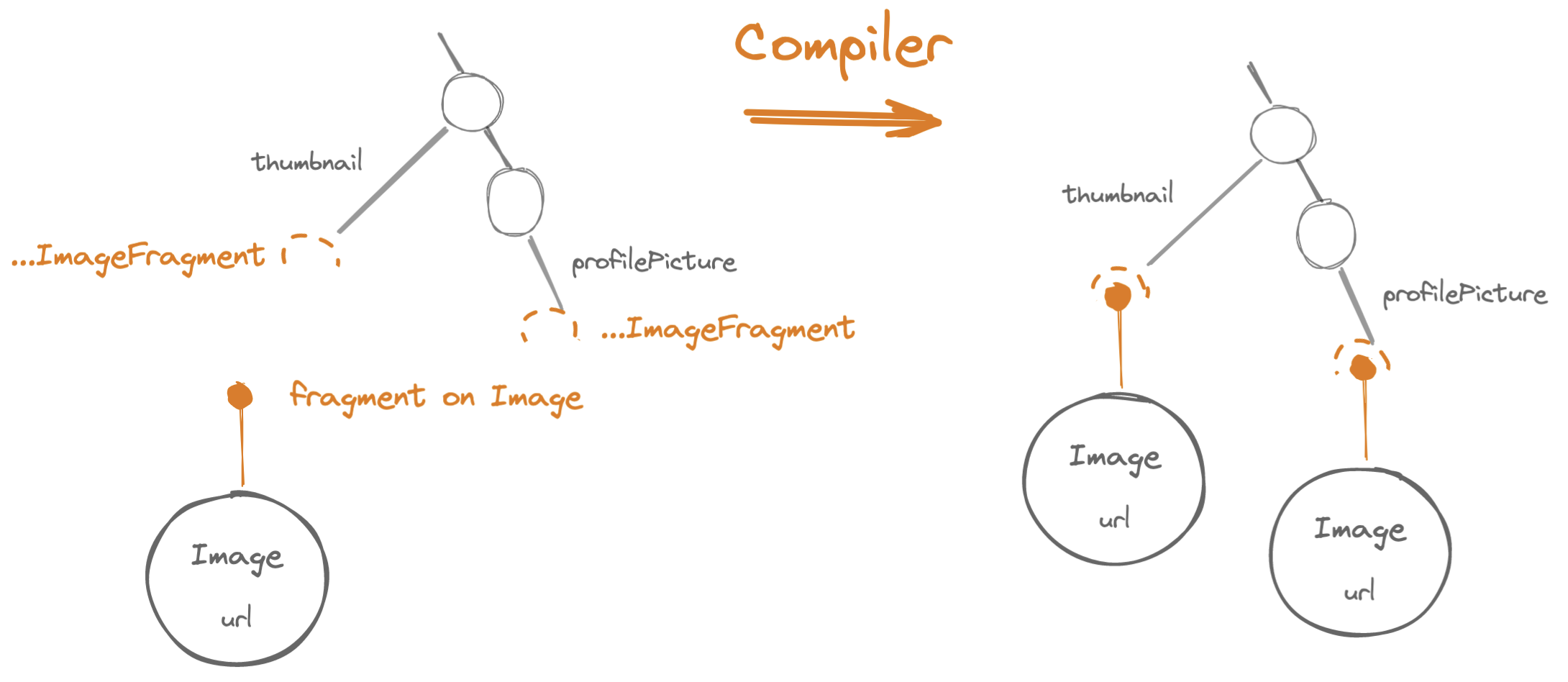
Step 1 — Define the fragment
Open up Image.tsx and add a Fragment definition:
import { graphql } from 'relay-runtime';

const ImageFragment = graphql`
  fragment ImageFragment on Image {
    url
  }
`;
Step 2 — Spread the fragment
Go back to StoryFragment and PosterBylineFragment and spread ImageFragment into it in each place where the Image component is what’s using the data:
- Story.tsx
- PosterByline.tsx
const StoryFragment = graphql`
  fragment StoryFragment on Story {
    title
    summary
    postedAt
    poster {
      ...PosterBylineFragment
    }
    thumbnail {
      ...ImageFragment
    }
  }
`;
const PosterBylineFragment = graphql`
  fragment PosterBylineFragment on Actor {
    name
    profilePicture {
      ...ImageFragment
    }
  }
`;
Step 3 — Call useFragment
Modify the Image component to read the fields using its fragment, and also modify its Props to accept the fragment key:
import { useFragment } from 'react-relay';
import type { ImageFragment$key } from "./__generated__/ImageFragment.graphql";

type Props = {
  image: ImageFragment$key;
  ...
};

function Image({image}: Props) {
  const data = useFragment(ImageFragment, image);
  return <img key={data.url} src={data.url} ... />
}
Step 4 — Modify once, enjoy everywhere
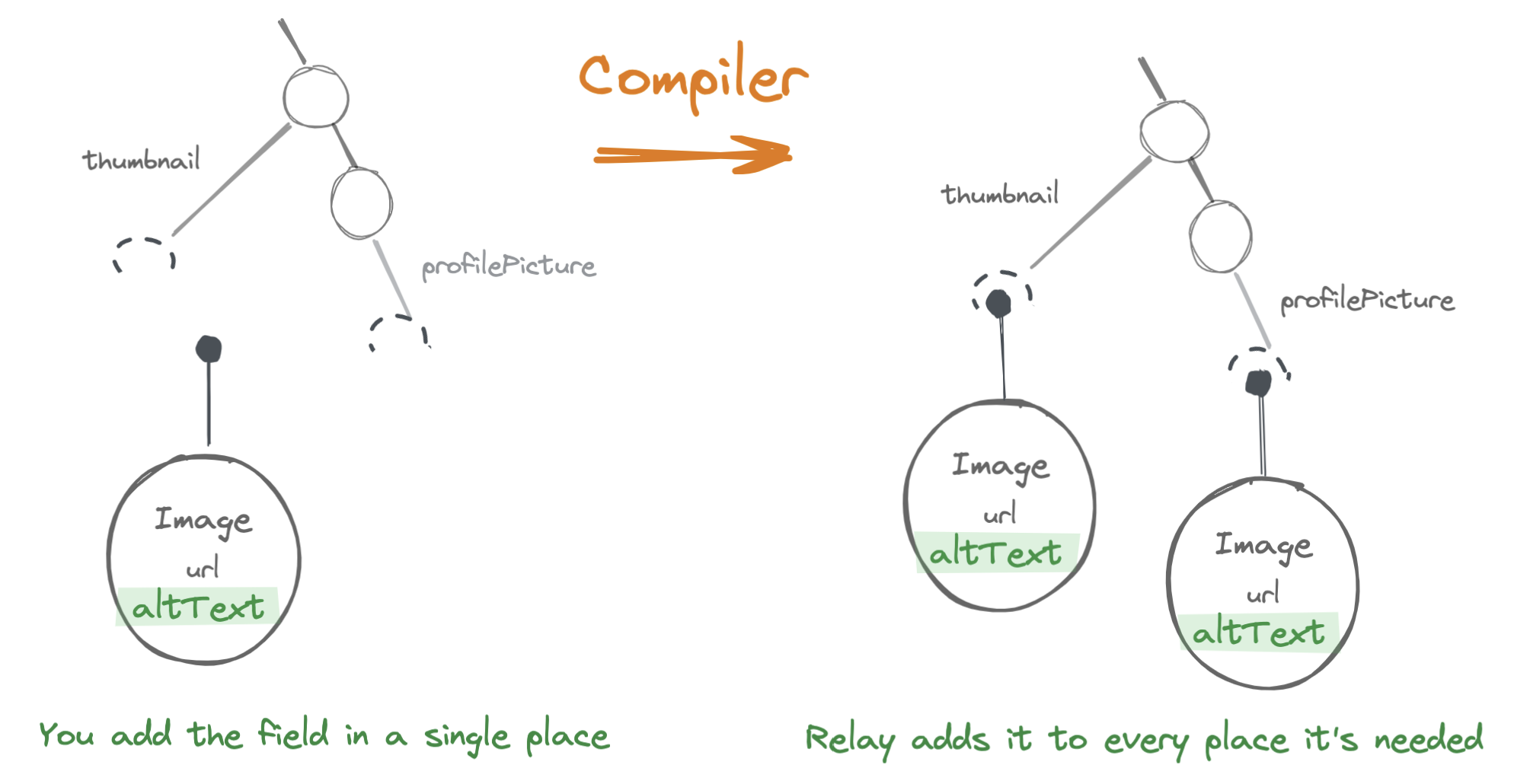
Now that we’ve fragmentized Image’s data requirements and co-located them within the component, we can add new data dependencies to Image without modifying any of the components that use it.
For example, let’s add an altText label for accessibility to the Image component.
Edit ImageFragment as follows:
const ImageFragment = graphql`
  fragment ImageFragment on Image {
    url
    altText
  }
`;
Now, without editing Story, Newsfeed, or any other component, all of the images within our query will have alt text fetched for them. So we just need to modify Image to use the new field:
function Image({image}) {
  // ...
  <img
    alt={data.altText}
  //...
}
Now both the story thumbnail image and the poster’s profile pic will have an alt text. (You can use your browser’s Elements inspector to verify this.)
You can imagine how beneficial this is as your codebase gets larger. Each component is self-contained, no matter how many places it’s used in! Even if a component is used in hundreds of places, you can add or remove fields from its data dependencies at will. This is one of the main ways that Relay helps you scale with the size of your app.
Fragments are the building blocks of Relay apps. As such, a lot of Relay features are based on fragments. We’ll look at a few of them in the next sections.
Fragment arguments and field arguments
Currently the Image component fetches images at their full size, even if they’ll be displayed at a smaller size. This is inefficient! The Image component takes a prop that says what size to show the image at, so it’s controlled by the component that uses Image. We’d like in a similar way for the component that uses Image to say what size of image to fetch within its fragment.
GraphQL fields can accept arguments that give the server additional information to fulfill our request. For example, the url field on the Image type accepts height and width arguments that the server incorporates into the URL — if we have this fragment:
fragment Example1 on Image {
  url
}
we might get the URL such as /images/abcde.jpeg
— whereas if we have this fragment:
fragment Example2 on Image {
  url(height: 100, width: 100)
}
we might get a URL like /images/abcde.jpeg?height=100&width=100
Now of course, we don’t want to just hard-code a specific size into ImageFragment, because we’d like the Image component to fetch a different size in different contexts. To do that, we can make the ImageFragment accept fragment arguments so that the parent component can specify how large of an image should be fetched. These fragment arguments can then be passed into specific fields (in this case url) as field arguments.
To do that, edit ImageFragment as follows:
const ImageFragment = graphql`
  fragment ImageFragment on Image
    @argumentDefinitions(
      width: {
        type: "Int",
        defaultValue: null
      }
      height: {
        type: "Int",
        defaultValue: null
      }
    )
  {
    url(
      width: $width,
      height: $height
    )
    altText
  }
`;
Let’s break this down:
- We’ve added an
@argumentDefinitionsdirective to the fragment declaration. This says what arguments the fragment accepts. For each argument, we give:- The name of the argument
- Its type (which can be any GraphQL scalar type)
- Optionally a default value — in this case, the default value is null, which lets us fetch the image at its inherent size. If no default value is given, then the argument is required at every place the fragment is used.
- Then we populate an argument to a GraphQL field by using the fragment argument as a variable. Here the field arguments and fragment arguments have the same name (as will often be the case), but note:
width:is the field argument while$widthis the variable created by the fragment argument.
Now the fragment accepts an argument that it passes along to the server via one of the fields it selects.
Deep dive: GraphQL Directives
The syntax for fragment arguments may look rather clumsy. This is because it is based on directives, a system for extending the GraphQL language. In GraphQL, any symbol starting with @ is a directive. Their meaning isn't defined by the GraphQL spec, but is up to the specific client or server implementation.
Relay defines several directives to support its features — fragment arguments for one. These directives are not sent to the server, but give instructions to the Relay compiler at build time.
The GraphQL spec actually does define the meaning of three directives:
@deprecatedis used in schema definitions and marks a field as deprecated.@includeand@skipcan be used to make the inclusion of a field conditional.
Besides these, GraphQL servers can specify additional directives as part of their schemas. And Relay has its own build-time directives, which allow us to extend the language a bit without changing its grammar.
Now the different fragments using Image can pass in the appropriate size for each image:
- Story.tsx
- PosterByline.tsx
const StoryFragment = graphql`
  fragment StoryFragment on Story {
    title
    summary
    postedAt
    poster {
      ...PosterBylineFragment
    }
    thumbnail {
      ...ImageFragment @arguments(width: 400)
    }
  }
`;
const PosterBylineFragment = graphql`
  fragment PosterBylineFragment on Actor {
    name
    profilePicture {
      ...ImageFragment @arguments(width: 60, height: 60)
    }
  }
`;
Now if you look at the images that our app downloads, you’ll see they’re of the smaller size, saving network bandwidth. Note that although we used integer literals for the value of our fragment arguments, we can also use variables supplied at runtime, as we'll see in later sections.
Field arguments (e.g. url(height: 100)) are a feature of GraphQL itself, while fragment arguments (as in @argumentDefinitions and @arguments) are Relay-specific features. The Relay compiler processes these fragment arguments when it combines fragments into queries.
Summary
Fragments are the most distinctive aspect of how Relay uses GraphQL. We recommend that every component that displays data and cares about the semantics of that data (so not just a typographic or formatting component) use a GraphQL fragment to declare its data dependencies.
- Fragments help you scale: No matter how many places a component is used, you can update its data dependencies in a single place.
- Fragment data needs to be read out with
useFragment. useFragmenttakes a fragment key which says where in the graph to read from.- Fragment keys come from places in a GraphQL response where that fragment was spread.
- Fragments can define arguments which are used at the point they’re spread. This allows them to be tailored to each situation they're used in.
We'll be revisiting many other features of fragments, such as how to refetch the contents of a single fragment without refetching the entire query. First, though, let's make this newsfeed app more newsfeed-like by learning about arrays.